Beyond the Chatbot: Defining AI Integration for Large-Scale Digital Products
In today's data-saturated digital landscape, professionals are routinely contending with cognitive overload. The sheer volume of information available often obscures rather than illuminates key insights, forcing users to spend more time navigating complex software than performing the strategic analysis it was built to support.
As designers and product leaders, our goal shouldn't be to build more interface; it should be to reduce friction. This is where contextual AI has a real role to play. Unlike general-purpose language models that draw on broad web knowledge, contextual AI functions as a dedicated, domain-specific partner. By anchoring itself to an enterprise's own validated data sources, it can deliver accuracy, consistency, and immediate relevance to the user's actual workflow. The key distinction is that it reasons dynamically, responding to what the user is doing right now, not serving up pre-written responses or generic web knowledge.
Strategic Placement: Choosing the Right Interface for the Job
Integrating AI effectively means moving past the default 'floating chat bubble.' A chat interface has genuine utility for open-ended queries and situations where a user actively wants to ask something. The problem is not the format itself, but treating it as the default. Applied indiscriminately, it asks users to context-switch, formulate prompts from scratch, and manage a separate stream of thought, adding cognitive load rather than reducing it.
The question worth asking, then, is whether a chat window is the right fit for the specific interaction, or whether inline, contextual placement would serve the user better. The diagram below illustrates this as a spectrum rather than a binary choice:
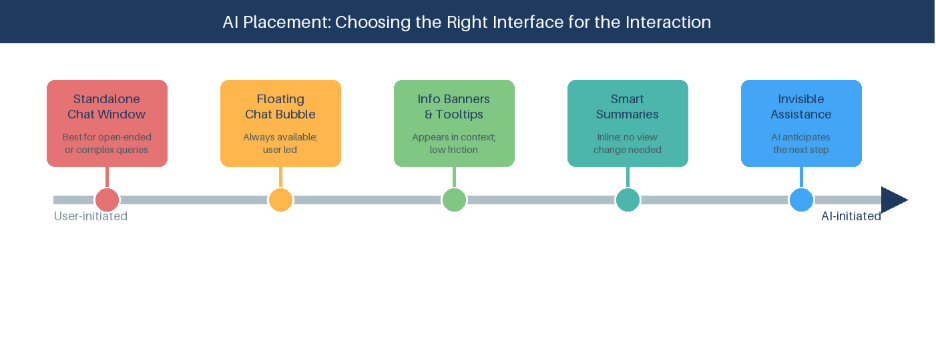
Figure 1: AI Placement — Choosing the Right Interface for the Interaction
The most effective placements share a common quality: they meet the user where they already are. Concretely, this means designing for:
- Contextual Tooltips: surfaced where the user is already looking, these are not static definitions written in advance. They are generated in the moment, based on what the user is actually viewing.
- Example: In a financial reporting dashboard, the AI detects that a regional revenue figure has dropped sharply compared to the prior quarter and surfaces a tooltip unprompted: “North West revenue is down 18% vs Q2, diverging from the national trend. The variance first appeared in week 6 and correlates with a change in the logistics supplier.” The user hasn't asked a question. The system has read the data, identified something worth flagging, and delivered it in context.
- Information Banners: positioned beneath relevant data sections, these are driven by the model actively monitoring the user's workflow state. Rather than a static notification, the banner reflects what the AI has inferred about where the user is in a process and what they are likely to need next. It anticipates rather than reacts.
- Example: A procurement manager is three steps into a supplier approval workflow. Before they reach the sign-off screen, a banner appears: “Two of the line items reference a supplier flagged for a compliance review last month. You may want to verify status before proceeding.” No prompt was entered. The AI monitored the workflow state and intervened at the right moment.
- Smart Summaries: displayed adjacent to large datasets, translating raw numbers into actionable insights without pulling the user out of their current view.
- Example: A logistics platform processing thousands of daily shipment records uses a summary panel alongside the data grid. Rather than scrolling through rows, the analyst sees: “14 routes flagged as delayed, primarily in the North West region. Average delay: 2.3 hours. Likely cause: supplier lead time variance.”
This approach aligns with established design heuristics, particularly visibility of system status. Embedding AI as an inline assistant, where the context calls for it, makes it feel like a natural extension of the interface rather than a separate tool the user has to go and find.
User Control, History, and Data Integrity
When designing these intelligent workflows, we must rigorously apply the principles of user control and freedom. Users need clear, accessible pathways to reverse AI-driven actions, exit automated states, or restart a process, without friction or penalty.
Error prevention deserves equal attention. The interface should proactively flag potential discrepancies and double-check information before a final decision is committed. Critically, every AI recommendation must be explicitly linked to its underlying source. The system should always cite the enterprise data it draws on, giving users the ability to verify and build justified trust in the output.
Designing Around History: A Key Trade-Off
Design solutions are rarely one-size-fits-all, and user interaction history is a useful illustration of this tension:
- In complex, data-heavy workflows, a comprehensive interaction history is essential for auditability and continuity. Users need to trace how a recommendation was reached.
- Example: In a clinical trial data platform, a researcher querying drug interaction results needs to see the full chain of prior queries and AI-generated summaries to validate that a new insight builds correctly on earlier findings. In a retail self-service returns tool, that same history is irrelevant; each transaction stands alone.
- In quick, transactional interactions, an always-on history panel becomes clutter. When an interaction is relevant only to the present moment, a minimalist approach is more appropriate.
- Example: A customer contacts a service chatbot with a one-off billing query. The AI resolves it, confirms the outcome and closes the interaction cleanly. Even though the underlying system has access to the full account history, surfacing it would add friction rather than value. The restraint is intentional — and just as much a design decision as anything the AI actively does.
In both cases, the principle holds: give users control over their data, including the ability to manage or clear their history, while letting the workflow context drive the default presentation.
Humanising vs. Functionalising AI Identity
How an AI presents itself matters as much as what it does. The choice of identity, whether that is a functional assistant, a conversational agent or a Digital Human, should be driven by the outcome the interaction is trying to achieve, not by convention or default.
A Digital Human makes sense when warmth, presence or a human quality of engagement is genuinely part of what the experience needs to deliver. A task-focused inline assistant makes sense when speed and precision are what matters. Neither is inherently superior; the use case decides.
What holds across all of it is intentionality. The language, tone and personality of the AI should be calibrated to the relationship it is meant to represent. Defined clearly from the outset, AI identity becomes a design asset rather than an afterthought.
Functionalising AI means designing it to be transparent, precise and unobtrusive. It does not introduce itself, express enthusiasm or apologise for limitations. It surfaces information when it is useful, stays quiet when it is not, and communicates in the register of the task rather than the register of conversation. In practice this means short, direct output: a flagged anomaly with a likely cause, a suggested next step with a clear rationale, a summary that leads with the conclusion. The AI is present in the result, not in the interaction.
Looking Ahead: Measuring Impact and ROI
As these tools mature, success metrics need to follow. Feature adoption tells you what people are clicking; it doesn’t tell you whether the AI is actually helping. Design teams should anchor their AI integrations to more tangible outcomes.
The three metrics below provide a practical framework for doing so:
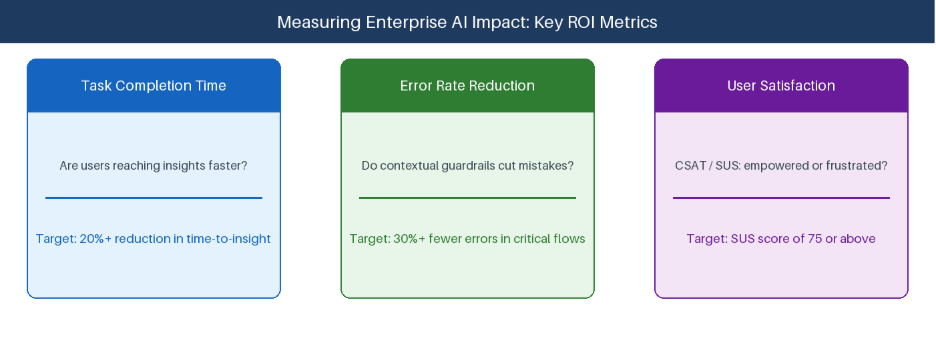
Figure 2: Three core metrics for evaluating AI ROI
Closing Thought
The most powerful AI integrations will be the ones users barely notice. Not because they do little, but because they do exactly what's needed, when it's needed, without demanding attention in return.
At Open Reply, this is how we work with clients: starting from the use case, identifying where AI can genuinely add value, and then determining which form of AI is right for that specific scenario. We also use AI in our own processes, so we bring that experience to the conversation. For organisations earlier in the journey, we offer accelerators and POC programmes that allow teams to test and validate AI approaches before committing to longer-term investment. If that's a conversation worth having, we'd be glad to start it.
Open Reply is the Reply Group company specialising in delivering industry-leading digital solutions to empower businesses in optimising their digital experience. At Open Reply UK, we take a consultative approach to understanding and activating our clients' vision, strategy, and aspirations. We believe in partnering closely with our clients to design bespoke solutions tailored to their short, medium, and long-term goals, driving tangible business value every step of the way. Our solutions are designed to scale, flex, and adapt to our clients' ever-evolving customer needs. From user experience design to customer-centric engineering, we bring products and digital experiences to life across all platforms. With our expertise, we help our clients truly understand and build meaningful relationships with their customers, leveraging the power of best-of-breed technologies to achieve unparalleled success.